TV moving boxes help protect screens during a move, but the box is only one part of safe packing. The best method also includes removing cords, covering the screen, adding soft padding, and keeping the TV upright. Careful labels and smart loading help stop drops, pressure, scratches, and missing parts.
A move can quickly create a pile of cords, remotes, screens, and small devices. Packing in a rush may cause cracked screens or lost chargers. A simple plan helps homeowners, tenants, and business owners prepare for the day of moving.
Jacksonville North Carolina Movers helps customers prepare homes and offices for a move. Most steps below are safe for people to do themselves. A mover may still help with large screens, heavy equipment, tight stairs, or a full packing job.
Table of Contents
- What supplies do you need to pack a TV and electronics?
- How should you prepare a TV before packing it?
- How do you pack a flat-screen TV in a moving box?
- How should you pack computers, monitors, and printers?
- How do you pack small electronics and their cords?
- How should you label and load boxes containing electronics?
- What should you do after moving electronics into the new home?
- Frequently Asked Questions
What supplies do you need to pack a TV and electronics?
You need a strong box, soft padding, packing paper, tape, and labels. The box should fit the item closely without pressing against the screen. TV moving boxes are made for screens and may have foam corners or parts that adjust to the TV.
Choosing the right TV moving boxes and protective materials
A flat-screen needs support on every side. Look for a box made for the TV’s size and shape. A double-wall carton has more support than a thin storage box. Foam corner guards, moving blankets, bubble wrap, and clean towels can add protection.
Use bubble wrap around the outside of a screen, not right against the display. Small air pockets may press into a delicate screen during handling. Cover the display first with a clean, soft cloth or foam sheet. Then add bubble wrap with the bubbles facing outward.
Other useful supplies include painter’s tape, zip bags, cable ties, cardboard dividers, and a marker. Painter’s tape can hold a note without leaving much sticky residue. Cable ties keep cords neat, but they should not squeeze the wires.
What to do if you no longer have the original packaging
The original box helps, but you do not need it. Pick a strong carton with room for corner padding and soft cushioning. The TV should not slide when the box is moved gently.
Do not use loose packing pieces that let the screen shift. Fill open spaces with crumpled paper, foam, or folded blankets. Keep heavy items away from the display. Jacksonville North Carolina Movers can help Jacksonville homeowners decide if a specialty box or packing service fits the move.
How should you prepare a TV before packing it?
Turn off, unplug, clean, and check the TV before wrapping it. This protects the screen and makes setup easier later. Let the TV cool down first if it has been running.
Disconnecting, labeling, and photographing cables
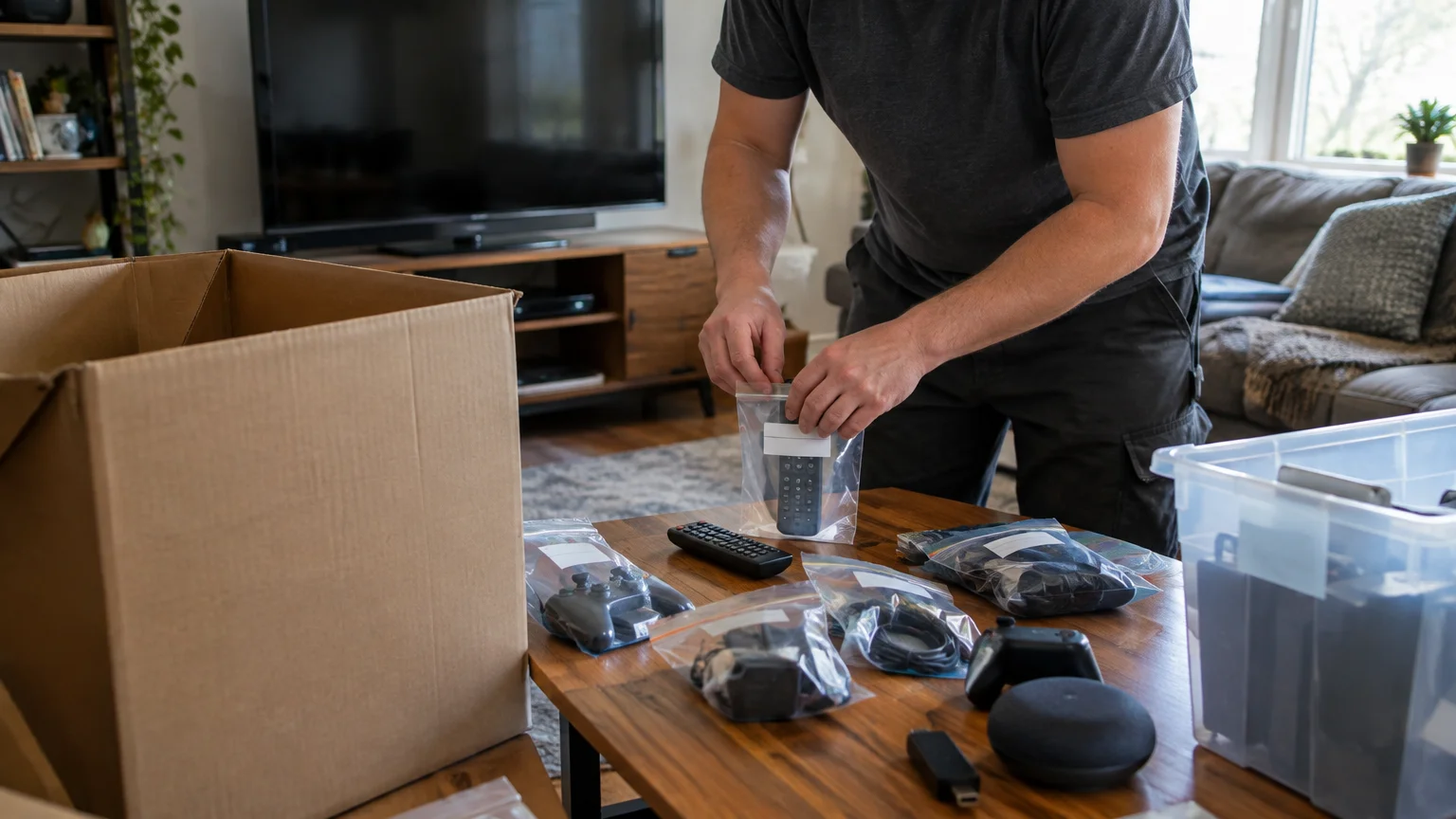
Take a clear photo of the back of the TV before removing cords. The photo shows where each cord belongs. Put the cords in a labeled bag, such as “TV power and HDMI cords.”
Add a second label when several cords look alike. A small piece of painter’s tape can identify a cord without harming it. Never pull a plug by its wire. Hold the plug and remove it gently.
Keep the remote, power cord, streaming device, and wall mount parts together. Small parts may disappear inside a large moving box. Put them in a sealed bag and tape the bag to the inside wall of the electronics box.
Cleaning and securing the screen and accessories
Dust the screen with a clean, dry microfiber cloth. Do not spray cleaner onto the display. Liquid may run into the edges and harm parts inside.
Remove the TV stand if it comes off. Wrap the stand and screws together in a small bag. Mark the bag clearly. If the stand cannot come off, protect its edges with foam and make sure it does not press into the screen.
Never tape anything directly to the screen. Do not place books, tools, or heavy items on top of a wrapped TV. These checks are safe for most homeowners and do not need professional help.
How do you pack a flat-screen TV in a moving box?
Pack a flat-screen TV upright, with padding around the display and firm corner support. The screen should not touch the carton. Have another person help lift a large or heavy TV to lower the risk of dropping it.
Wrapping the screen without causing pressure damage
Start with a clean, soft layer over the display. Add foam or a moving blanket around the front, back, and sides. Keep the material smooth. Folds and hard edges can make pressure points.
Add corner guards before putting the TV into the box. You may use stretch film to hold blankets in place if it does not press on buttons or the screen. Stretch film should not replace proper padding.
Never carry a large TV by one corner. Hold it with both hands near the side edges. Keep the screen away from sharp objects while carrying it.
Positioning and cushioning the TV inside the box
Place the TV upright in the carton. Most flat screens should not lie flat during transport. Weight and movement can stress the display. Follow the maker’s instructions when they are available.
Add foam or folded blankets between the TV and each box wall. Leave no large open space, but do not force padding into a tight gap. Close the box and gently test for movement. If the TV shifts, open the box and add soft cushioning.
Seal the carton with strong packing tape across the main seam. Add tape around the top edges if needed. Write “FRAGILE,” “TV,” and “KEEP UPRIGHT” on several sides. These labels help, but careful handling matters most.
How should you pack computers, monitors, and printers?
Computers, monitors, and printers need protection from impact, dust, and movement. Give each item its own padding and, when possible, its own box. Do not pack a tower, laptop, and monitor loose in one large carton.
Protecting towers, laptops, and monitors
Shut computers down fully before packing them. Do not pack a laptop while it is hot or still running. Remove discs, USB devices, and memory cards. Place these small items in labeled bags.
An anti-static bag helps protect a desktop tower from static electricity. Wrap the tower in one if available, then add foam or a moving blanket. Keep it upright when its design or inside parts make that important. Do not put heavy items on top.
Pack monitors like TVs. Cover the display first, then add soft padding and corner protection. A laptop can go into a padded sleeve or case before going into a strong box. Fill empty space so the computer cannot slide.
Packing printers and securing moving parts
Remove paper and loose trays from a printer. Follow the maker’s instructions about moving ink or toner. Keep removed ink and toner sealed in separate bags in case they leak. Also follow the maker’s instructions for securing the print head or carriage.
Use painter’s tape to hold doors, trays, and covers closed when needed. Do not use strong tape on painted or delicate surfaces. Wrap the printer with padding and place it level unless the maker gives different instructions.
A business move may include servers, copiers, or other special equipment. These items may need custom packing and careful transport. Jacksonville North Carolina Movers can help local offices in the main Jacksonville area, including Utopia Mobile Home Park, Houston Mobile Home Park, Pumpkin Center, Half Moon, Piney Green, and Sneads Ferry, plan for delicate equipment.
How do you pack small electronics and their cords?
Small electronics are easier to manage when each item is cleaned, labeled, and grouped before boxing. Remotes, chargers, controllers, speakers, and streaming devices should not sit loose in a large carton.
Sorting remotes, chargers, controllers, and cables
Group each accessory with the device it serves. Put each remote in a labeled bag, and pack loose batteries separately with their ends protected. Keep batteries apart from devices when the maker advises it, especially during long storage.
Sort cords by room or device. Use a soft cable tie or hook-and-loop strap on each cord. Avoid tight knots because they can harm the wire. A photo of each device and its cords can make setup much faster.
Use small boxes inside a larger electronics carton for tiny parts. Label each inner box clearly. This works well for game controllers, smart speakers, cameras, tablets, and computer accessories.
Preventing scratches, tangles, and missing accessories
Wrap screens, lenses, and glossy surfaces in soft cloth. Keep metal plugs away from displays and painted surfaces. Do not place loose cords on delicate devices.
A simple inventory helps prevent missing items. List the device, its cord, its remote, and any special parts. Keep the list inside the box and take a photo before sealing it.
Back up important data before moving any device that stores files. A moving company can protect packed items, but it cannot replace lost files. Data backup is a safe task for the owner before moving day.
How should you label and load boxes containing electronics?
Electronics boxes should show what they hold, where they belong, and which side must stay up. Load them where they will not be crushed, soaked, or shaken. Good labels guide the crew, but they cannot make a weak box safe.
What information to write on each electronics box
Write the device name on at least two sides of the carton. Add the destination room and words such as “FRAGILE” and “KEEP UPRIGHT.” Mark boxes that hold cords or small parts.
Numbering boxes helps with a larger move. For example, “Living room electronics, 1 of 3” shows if a box is missing. Keep the inventory with your other moving records.
Do not write passwords or private account details on boxes. Keep those details secure. A label only needs enough information for safe handling and unpacking.
Where to place delicate electronics in the moving vehicle
Place electronics on a stable surface away from furniture, tools, and loose metal items. Keep boxes upright and secure them so they cannot slide. Never place them where other cargo can fall onto them.
Protect cartons from rain, snow, and damp floors. Temperature changes can also affect some devices. Let cold electronics reach room temperature before turning them on. This wait may help prevent moisture problems.
On moving day, professional movers can handle hard carries, narrow stairs, elevators, and heavy screens. A local team such as Jacksonville North Carolina Movers may also help plan packing when a home or office has more equipment than the owner can manage.
What should you do after moving electronics into the new home?
Unpack electronics on a clear, dry surface and check each item before connecting it. Look for cracked screens, bent ports, loose parts, or damaged cords. Do not turn on a device that looks wet or badly damaged.
Unpacking electronics safely and checking for damage
Take photos as each box opens. Compare the contents with your inventory. Remove padding slowly and keep small bags with their matching devices.
Let electronics sit at room temperature if they came from a very cold or hot vehicle. Check the maker’s instructions before powering them up. Reconnect cords by using the photos taken before the move.
Test one device at a time. Start with power, then check the display, sound, remote, and other basic functions. If something does not work, unplug it and inspect the cord before trying again.
When professional movers can help with delicate equipment
Most people can pack small electronics and a few household screens themselves. Professional help makes sense when a TV is very large, the route has stairs, the item needs a custom crate, or the move includes many devices.
Movers can also help tenants protect walls and floors in an apartment. Business owners may need help limiting downtime while computers and office equipment move. Jacksonville North Carolina Movers serves customers and nearby areas with support suited to the size and access needs of the job.
The safest plan is simple: prepare each device, use the right padding, keep boxes upright, and check items before use. For help with delicate electronics, Contact us today to discuss your moving needs and request a quote.
Key takeaways
- Use a strong box with soft padding and corner support.
- Keep flat-screen TVs upright and stop them from sliding.
- Label cords, remotes, stands, and other small parts.
- Keep electronics away from heavy items, water, and loose tools.
- Let devices reach room temperature before turning them on.
Frequently Asked Questions
Should a TV be packed upright or flat?
A TV should usually be packed and moved upright. This position helps limit pressure on the display during handling. It needs padding on all sides, firm corner support, and no room to slide inside the carton. Always follow the maker’s guidance when it gives different transport instructions.
Can bubble wrap touch a TV screen?
Bubble wrap should not press directly against a TV screen. Place a soft, clean cloth or foam sheet between the display and the bubble wrap. Wrap the unit gently, then add corner protection and a strong box. Too much pressure can damage a delicate flat screen.
What is the best box for a large television?
The best box fits the TV closely while leaving room for soft padding and corner guards. A specialty TV carton is often easier to use than a regular box. If the original carton is gone, choose a strong box that keeps the screen upright and prevents movement.
How should someone pack TV cords and remotes?
Place each cord and remote in a labeled bag with the device it serves. A photo of the connections can help during setup. Use soft cable ties instead of tight knots. Keep small bags inside the main electronics box so they do not get lost.
When should a mover pack a television?
A mover can help when the television is large, heavy, valuable, hard to carry, or near stairs and tight turns. Professional packing may also help during an office move with many monitors and devices. Small TVs and simple accessories are often safe for an owner to pack.
If you are not sure what you are dealing with, it is worth having someone look at it before it turns into a bigger job. Get in touch with Jacksonville North Carolina Movers today and we will tell you where you stand.